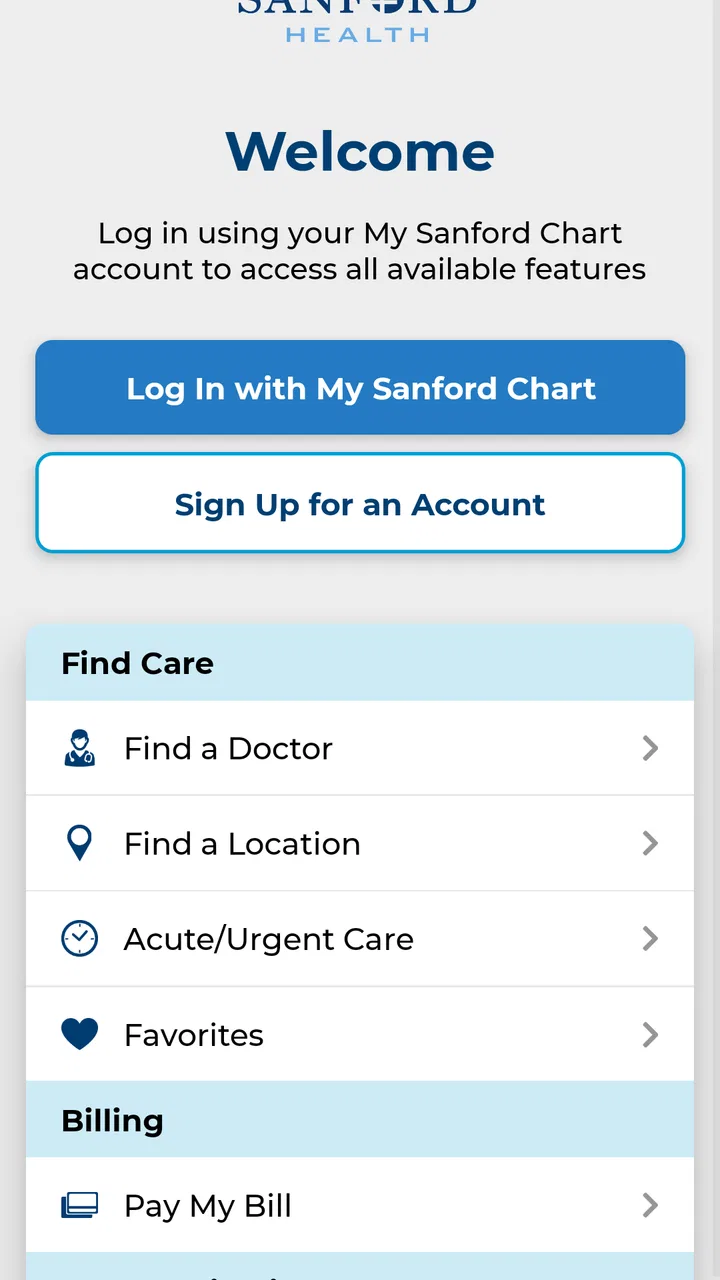
Sanford Health
- 4.1
- Rating
- 100.00K
- Installs
- Free
- Price

 Analysis by App-foxy
I found Sanford Health most useful as a practical starting point for managing everyday healthcare through one recognizable service rather than as a replacement for a doctor, pharmacist, or emergency line. It is a free medical app from Sanford Health, and its broad purpose is clear: bringing health-related tasks closer to the phone you already use. My overall view is positive, but with an important qualification. Its value depends heavily on whether Sanford Health is part of your normal care routine. If it is, the app can reduce small points of friction. If it is not, the experience is unlikely to justify installing another general health tool.
The app has been available since April 12, 2013, which gives it a more established feel than a newly launched healthcare product. Its current version is 3.20.0, and it requires at least iOS 11. That combination suggests a product that has been maintained over time while still supporting a fairly broad range of devices. Sanford Health is rated 4.1 on average from around 1,400 ratings, with about 420 written reviews, and it has passed 100,000 installs. Those figures do not prove that every user will have a smooth experience, but they do show that this is a real, regularly used medical app rather than an abandoned experiment.
What using Sanford Health feels like in daily life
The first thing I noticed is that this is not trying to be a wellness game, a symptom encyclopedia, or a replacement for a personal health routine. The identity is much more closely tied to Sanford Health itself. That makes the app easier to understand: it is aimed at people who want their healthcare relationship to be more accessible from a mobile device.
You May Also Like

 Blood Strike: 2.5 Anniversary
Blood Strike’s Loadouts Turn Every Drop Into a Tactical Gamble
A close look at Blood Strike’s custom loadouts: how fast access to signature weapons reshapes its battle royale rhythm, rewards preparation, and narrows the gap between fights.

 Pandora - Music & Podcasts
Pandora’s Music Is Easy to Start, but Harder to Recover
Pandora’s strength is its low-effort path from a seed to a station. Its weak spot is how much confidence it asks you to place in connection, setup, and quiet recovery.

 8 Ball Pool
 Is Built on Rivalries, Rematches, and Routine
A close look at the rivalries, rematches, shared routines, and unanswered safety questions that turn a quick pool match into a persistent mobile community.

 Samsung Music
’s Quiet Strength Is Playing What You Already Own
Its reach comes less from spectacle than from dependable access to a personal library. That simplicity is both the app’s strongest retention engine and its ceiling.

 AccuWeather: Weather Radar
AccuWeather Review: A Quick, Clear Forecast for Everyday Decisions
For everyday plans, the best forecast is the one you can understand quickly. AccuWeather makes rain timing, radar, and local conditions easy to act on, with a few trade-offs.

 Hill Climb Racing
Why Hill Climb Racing Still Turns Crashes Into One More Run
A tiny car, a bumpy hill and one more upgrade: Hill Climb Racing keeps resurfacing because its simple chaos makes every near-miss feel personal.
More From Our News Desk



That focus matters because many health apps become cluttered with unrelated tracking tools. A person may only want to handle a healthcare task without opening a browser, searching through old messages, or remembering which page belongs to which service. A dedicated app can make that process feel more direct. In my experience, the strongest reason to keep it installed is not that it offers endless content; it is that it can become a familiar doorway to care-related information and services.
I would approach Sanford Health with the same expectations I bring to a clinic’s patient app. It is most useful when I already have a reason to interact with the healthcare system. For example, imagine noticing a change in a recurring health issue on a weekday evening. I may not need emergency help, but I also do not want to wait until I am back at a computer. Having the relevant healthcare app ready can help me begin with the appropriate digital route instead of searching the web while tired or worried.
That scenario also shows the app’s limits. Convenience does not make a medical concern less serious. Sanford Health should not be treated as an emergency service, and I would not use a mobile app to delay urgent care. The sensible workflow is to use it for routine contact and organization, while choosing immediate professional help when the situation calls for it.
A useful companion for people already connected to Sanford
The developer, Sanford Health, is also the reason this app feels more specialized than a generic health organizer. A general app can help me count steps, record symptoms, or store notes, but it cannot necessarily connect those habits to the healthcare service I actually use. Sanford Health is better understood as a service companion: its usefulness grows when my appointments, questions, and care decisions are already connected to Sanford.
This is an important distinction for families. A person helping a parent or another relative may appreciate having a recognized healthcare channel on a phone rather than relying on scattered paper instructions and browser bookmarks. At the same time, I would be careful about treating the app as a shared family record without checking who is signed in and whose information is being viewed. Medical apps require more attention to account boundaries than ordinary shopping or entertainment apps.
The same caution applies when changing phones or reinstalling the app. I would make sure I can access the associated account before depending on Sanford Health for an upcoming healthcare task. A few minutes spent checking login details in advance is much better than discovering a problem when I am trying to handle something time-sensitive but non-emergency.
Where it has an advantage over ordinary alternatives
The usual alternatives fall into three groups: calling a clinic, using a browser, or installing a broad health-management app. Calling remains the best option when I need a conversation, when the issue is complicated, or when I am unsure which service is appropriate. A browser may be more comfortable for reading long information or completing a task on a large screen. General health apps are often better for personal tracking and lifestyle goals.
Sanford Health sits between those options. It can be more convenient than a phone call for simple digital tasks and more focused than a generic health app because it is associated with a specific healthcare provider. That focus is its clearest strength. I do not have to turn a general fitness or symptom-tracking application into a clinic tool; I can use a healthcare-specific app for healthcare-related interactions.
There is also a subtle benefit in reducing decision fatigue. When I am already familiar with the Sanford Health name, I am less likely to wonder whether I am using the correct service. This may sound minor, but healthcare tasks often happen when people are distracted, uncomfortable, or caring for someone else. A clear, provider-specific entry point can be more valuable than a longer list of features.
Still, the browser has one advantage that should not be ignored: flexibility. If I am only an occasional Sanford patient, opening a website when necessary may be enough. Installing the app makes more sense when I expect repeated use, want a dedicated place for healthcare access, or prefer not to search for the service each time.
The meaningful weakness: usefulness is tied to the provider relationship
The central weakness is also the product’s defining limitation. Sanford Health is not a universal medical hub. Its practical value is closely tied to whether I receive care through Sanford Health and whether the tasks I need are supported in the app’s current experience. Someone looking for medication reminders, detailed symptom journaling, exercise coaching, or a complete record assembled from several unrelated providers may be better served by a different type of application.
This does not make Sanford Health a poor app; it simply means I would not install it based on the broad promise of “health” alone. The category is medical, but that label covers very different needs. A person wanting a personal wellness dashboard should look for a wellness-focused product. A person needing a reliable way to communicate with a Sanford-connected healthcare service has a much stronger reason to choose this one.
Another possible source of friction is that a healthcare app must balance simplicity with sensitive information. A streamlined experience is helpful, but it may not provide the same depth as a full desktop portal or a direct conversation with staff. I would expect to switch channels when a request becomes complicated, when I need detailed clarification, or when the app does not offer the exact action I have in mind. That is normal for this kind of tool, but it is worth knowing before making it the center of an entire healthcare routine.
The age rating is Everyone, which makes the app broadly approachable from a content perspective. That should not be confused with medical suitability for every situation. Children, older adults, and people managing complex conditions may still need an adult caregiver or healthcare professional to interpret information and decide what to do next. The app can support access, but it does not remove the need for judgment.
Small habits that make the app more useful
I would not wait until an appointment day to discover how Sanford Health fits into my routine. The first useful test is simple: open it when I am calm, confirm that I can reach the right account or service, and learn where the common healthcare actions are located. This turns the app from an unknown download into a tool I have already practiced using.
A second good habit is to keep the app’s role narrow and clear. I would use it as the Sanford Health doorway, while keeping a separate method for personal notes, medication schedules, or questions I want to discuss at an appointment. That division prevents one app from becoming an unreliable catch-all. It also makes it easier to tell whether a problem belongs in the app, in a phone call, or in urgent medical care.
A third insight is that the app may be most valuable between major healthcare events, not only during them. When I have a routine question, need to prepare for a visit, or want to organize the next step in care, a dedicated provider app can reduce the temptation to search random health websites. I still need to evaluate medical information carefully, but starting from the service connected to my care is usually more sensible than beginning with an anonymous search result.
For people assisting relatives, I would establish a clear routine before an appointment: decide who will use the phone, verify the correct account, and write down questions separately. This avoids trying to remember everything while moving between screens. It is a modest workflow change, but it can make a medical app feel much less stressful.
Who should install it, and who should skip it?
I would recommend Sanford Health first to current Sanford Health patients who prefer handling routine healthcare tasks from a phone. It is also a reasonable choice for caregivers or family members who regularly help someone connected to Sanford, provided account access and privacy are handled carefully. The free price removes the financial barrier to trying it, so the main question is relevance rather than cost.
I would be less enthusiastic for someone who has no relationship with Sanford Health. In that case, a local provider’s own app, a general patient portal, or a secure communication method tied to the person’s actual clinic may be more useful. Installing this app simply because it appears in the medical category would probably add clutter without solving a real problem.
I would also steer away from it as a primary choice for someone seeking a comprehensive health tracker. If the goal is detailed fitness analysis, habit streaks, food recording, or symptom patterns across many providers, Sanford Health is not the type of app I would expect to handle that entire job. Its strength is focused healthcare access, not an all-purpose personal data warehouse.
People using older Apple devices should check compatibility before planning around it, because the minimum requirement is iOS 11. That is not an especially demanding requirement for many users, but it can matter on an older phone that has not been updated. I would also keep the operating system current when possible, since medical apps handle information that deserves basic device security and stability.
My final assessment
After looking at Sanford Health as a real everyday tool rather than judging it by its category alone, I see a focused app with a clear audience. Its best quality is the reduction of distance between a Sanford Health patient and the healthcare service they already use. That is more meaningful than a long feature list because it addresses a practical problem: getting to the right care-related channel without unnecessary searching.
The trade-off is equally clear. The app is not the right answer for every medical need, and its usefulness falls sharply when I am not connected to Sanford Health. I would still keep a phone number, emergency plan, and separate personal health notes rather than relying on one application for everything. For complex questions, a professional conversation remains better; for urgent symptoms, immediate care matters more than any digital workflow.
My recommendation is therefore specific rather than universal. If Sanford Health is part of your healthcare life, the free app is worth trying and testing before you need it. Its 100,000-plus installs and 4.1 average show that many people find value in having this provider-focused option available, while the long-running release history suggests it has remained relevant over time. If you want a broad wellness platform or a tool that combines every provider and lifestyle metric, I would choose something designed for that purpose instead.
In short, I would describe Sanford Health as a sensible medical companion for the right patient, not a complete healthcare replacement. Used for routine access, preparation, and staying connected to Sanford, it can make ordinary healthcare administration feel less scattered. Used as a universal answer to symptoms, emergencies, or personal wellness tracking, it is the wrong tool. That distinction is what makes the app easy to recommend to some people and easy to skip for others.
FAQs for Sanford Health
01What is the Sanford Health app used for?
The Sanford Health app is designed to help patients manage many healthcare tasks from a mobile device. Depending on your location and available services, you may be able to schedule or request appointments, view test results, review medical records, message care teams, manage prescriptions, check billing details, and access virtual care. Available features can vary by patient, clinic, and region.
02Do I need to be a Sanford Health patient to use the app?
Many of the app’s most useful features require an active Sanford Health patient account and access to the organization’s online patient portal. Some public information, provider searches, appointment details, or health resources may be available without signing in. However, to view personal records, communicate with clinicians, or manage prescriptions, you will generally need to register or log in with valid Sanford Health credentials.
03How do I sign in or create a Sanford Health account?
After installing the app, you can usually sign in with the username and password connected to your Sanford Health patient portal account. New users may be able to create an account through the registration option, often using identifying information or an activation code supplied by Sanford Health. If you cannot verify your identity or remember your login details, use the recovery tools or contact Sanford Health support.
04Can I use Sanford Health for virtual appointments and messaging?
The app may support virtual visits and secure communication with eligible Sanford Health providers, but availability depends on the type of appointment, your care team, location, insurance requirements, and technical setup. Before a video visit, make sure your device has a working camera, microphone, and reliable internet connection. Secure messages are intended for routine questions and should not replace emergency medical assistance.
05Is the Sanford Health app safe for viewing personal medical information?
The Sanford Health app is intended to provide secure access to health information through protected account sign-in and patient portal systems. You should still take personal precautions, including using a strong password, enabling device security, avoiding public Wi-Fi for sensitive tasks, and signing out on shared devices. Never use the app for an emergency; call emergency services or seek immediate in-person care when necessary.
Pros
- Easy access to appointments
- providers
- and health records in one app.
- Secure messaging helps you communicate directly with your care team.
- Prescription refill requests can save time during routine medication management.
- Health reminders support better organization of visits and preventive care.
- Useful for managing care within Sanford Health’s regional network.
Cons
- Many features may be limited if you are not a Sanford Health patient.
- Some actions require account verification and may take time to set up.
- Appointment availability depends on your location and participating providers.
- The app may feel less useful for users needing care outside the Sanford network.
- Certain services may redirect you to web pages instead of staying in the app.

Sanford Health
Gallery